


PPCall - Online Video Chat
4.5457.00 Reviews
App Specs
- Version
- 1.3.0
- Updated On
- License
- Free
- Downloads
- 5,000,000+
- Developer
- Gamaa Studio
- Categories
- Social
- Platform
- Android
Screenshots



 Analysis by AppCompare
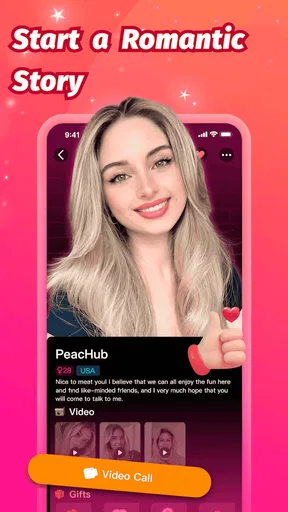
I approached PPCall - Online Video Chat as someone looking for a simple way to meet people beyond my existing contacts, not as a replacement for every social network on my phone. It is a free social app from Gamaa Studio, built around video conversations, text messages, and discovering people through shared interests. That combination gives it a more direct feel than a feed-based network: the point is less about endlessly scrolling and more about starting a personal exchange.
The first thing I would tell a friend is to set realistic expectations. PPCall is aimed at adults, carries a Mature 17+ content rating, and includes optional purchases ranging from $0.99 to $99.99 per item. The free entry makes it easy to try, but the experience is still one where you should pay attention to what you tap and decide early whether the available interactions justify spending anything.
At the time of my review, the app is on version 1.3.0 and works with Android 7.0 or later. Its broad reach is reflected in more than five million installs, while its average score sits at 4.5 from around thirty-three thousand ratings. Those figures suggest that many people find the basic idea appealing, although they do not remove the need to judge conversations individually. A large community can mean more chances to connect, but it can also mean more effort separating useful interactions from forgettable ones.
What the first session feels like
PPCall makes the most sense when I have a clear reason for opening it. That reason might be wanting a relaxed video conversation, looking for someone with a particular interest, or simply trying a more personal form of online socializing than comments and reactions. If I open it without any idea of what I want, the experience can feel less focused because a social discovery app depends heavily on the quality of the people I encounter and the way I choose to approach them.
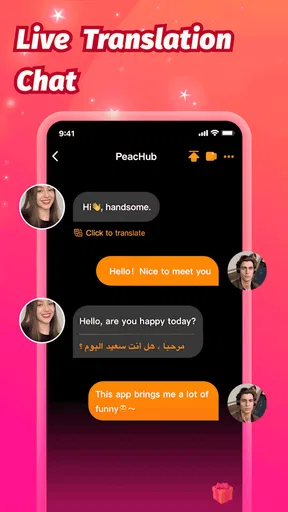
The app’s three central ideas work together. Video chat creates a stronger sense of presence than text alone, messages give me a less demanding way to begin, and shared interests provide a possible starting point when I do not know what to say. That last part is especially useful for first-time users. Instead of sending a completely empty greeting, I can use a common interest as a natural opening and quickly see whether the conversation has any direction.
I would not treat the service like a private address book. The social value comes from meeting people outside my existing circle, which also means I need to be selective. A profile or an interesting topic is not the same as trust. I prefer to begin with messages, keep the first exchange general, and move to video only when the interaction feels comfortable and worthwhile.
That gradual approach is one of the best ways to make the app feel manageable. New users sometimes assume that a video-focused service expects them to appear on camera immediately. I found it more sensible to use text as a screening step. A short conversation can reveal whether someone is respectful, whether both people want the same kind of interaction, and whether a live call would actually be enjoyable.
Worth Reading Before You Choose

EA SPORTS FC Mobile 26 Is a Bigger Football Game, but It Takes Time

Flipboard Shows What News Apps Must Do Beyond the Feed

Switching to Android Auto Means Rethinking Your Driving Routine

Google Calendar Makes a Crowded Week Easier to Manage

Ludo King Makes the Most of the Minutes Between Plans

Baby Panda World Brings Quick Play to Modern Phones, but Its Game Library Feels Busy
Who will get the most from it
PPCall is a good fit for adults who enjoy meeting unfamiliar people and who are comfortable with the unpredictability of live social apps. It can suit someone who wants casual conversation after work, a way to discuss hobbies with people from different places, or a more human alternative to posting into a public feed. It is also useful for people who find it easier to connect through a shared subject than through formal introductions.
I would be more cautious recommending it to someone who wants a tightly controlled community, a professional networking tool, or a messaging app limited to friends and family. It is not the best choice if your priority is a quiet, predictable space with only people you already know. Likewise, anyone uncomfortable with appearing on camera should treat the video element as optional rather than assuming the app will feel like ordinary text messaging.
The Mature 17+ rating matters here. Parents should not view the app as suitable for younger users simply because the download itself is free. Adults should also remember that age labeling does not guarantee that every conversation will match their personal comfort level. My advice is to protect personal details, avoid rushing into private exchanges, and leave a conversation as soon as it becomes pressuring or inappropriate.
Getting started without overcommitting
My preferred first setup is deliberately conservative. I would install the app, review each screen carefully, and complete only the information needed to begin exploring. A social profile does not need to reveal a workplace, home area, daily routine, or other details that could identify me too easily. A broad description of interests is enough to test whether the discovery side of the app is useful.
Before using video, I would also prepare the practical side of the experience. A quiet room, a stable connection, and a camera angle that does not reveal private surroundings make a noticeable difference. This is not about creating a polished performance. It is about controlling what the other person can see and avoiding distractions that can make a first call feel awkward.
Because the service includes in-app purchases, I would decide in advance that the first session is a trial rather than a shopping trip. I would explore the free path first, note which actions are available without payment, and read any purchase prompt before confirming it. The listed purchase range stretches from small individual items to much larger ones, so a casual tap can have very different consequences depending on what is being offered at that moment.
That is also why I would not judge the app after only a few minutes. Social discovery is affected by timing, the people currently available, and how specifically I present my interests. A vague profile and a rushed first message can make a useful service seem empty. I would give myself one focused session, then decide whether the conversations are producing enough value to return.
Reaching the first meaningful interaction
The first successful action should not be “make a video call with a stranger.” For me, success is finding one person with a compatible interest and having a short, comfortable exchange. That goal is more realistic and gives the app a fair test. I would browse with one or two topics in mind, choose a person who appears relevant, and start with a message that refers to the shared subject rather than using a generic greeting.
A useful opening is simple: mention the interest, ask an easy question, and leave room for the other person to answer. If the response is thoughtful, I can continue. If it is vague, demanding, or unrelated, I have learned something without spending time on a call. This message-first workflow is one of the more practical ways to use PPCall because it turns the large social pool into a smaller group of plausible conversations.
Once the exchange feels natural, video can add something that text cannot. Facial expressions, timing, and tone make it easier to tell whether a conversation is genuinely relaxed. I still would not share sensitive information during that first call. The goal is to see whether the person is respectful and whether the interaction works in real time, not to create instant trust.
For an everyday example, imagine finishing a long day and wanting to talk about photography rather than watch another stream of short posts. I would open PPCall, look for someone whose interests overlap with mine, exchange a few messages, and suggest a brief video chat only if the conversation feels balanced. If the call is enjoyable, I have found a reason to return. If it is uncomfortable, I can end it without having exposed much personal information.
Small choices that improve the experience
The first useful technique is to treat shared interests as conversation filters, not as proof of compatibility. Two people can like the same subject and still want completely different types of interaction. I use the topic to start the conversation, then pay attention to whether the other person asks questions, respects boundaries, and contributes equally.
The second is to separate discovery from commitment. I do not move from seeing an appealing profile straight into a long call or a purchase. I use a short message to test the tone, a short call to test the chemistry, and only then decide whether the connection deserves more attention. This staged workflow saves time and reduces the pressure that can come from treating every new contact as important.
The third is to make the camera work for privacy. I choose a neutral background, remove visible documents, and avoid showing locations or belongings that reveal more than intended. A video chat can feel friendly while still exposing information in the background. Controlling the scene is a small step, but it gives me much more confidence during conversations with people I have just met.
A fourth practical habit is to judge the app by repeatable outcomes rather than by the number of profiles I can browse. If I regularly find respectful conversations around subjects I care about, PPCall is doing something valuable for me. If I am only moving through profiles without meaningful exchanges, more browsing will not necessarily solve the problem. Narrowing my interests and improving my opening message is usually a better experiment.
Where new users may feel confused
The biggest possible confusion is the relationship between the free download and optional spending. “Free” means I can begin without paying, but it does not mean every interaction or enhancement must remain free. When a purchase screen appears, I would stop and identify exactly what the item does before continuing. I would also avoid treating a paid option as a shortcut to trust or better conversation; money cannot replace basic compatibility.
Another point of confusion is the difference between messaging and video chat. Text is not merely a secondary version of the app. It is the safer and more flexible first step, especially when I am still deciding whether someone is worth talking to. Video is more immediate, but that immediacy can be a disadvantage if I accept calls too quickly or feel pressured to stay on camera.
Some users may also expect shared interests to produce perfectly matched recommendations. I would not use them that way. They are helpful conversation clues, but they cannot capture personality, availability, communication style, or intentions. The app becomes easier to understand when I see discovery as a starting point and take responsibility for choosing which conversations continue.
Finally, a high overall rating should not be mistaken for a promise that every session will be successful. Social apps are naturally uneven. One evening may bring a great exchange, while another may offer little of interest. I would evaluate PPCall over several purposeful visits, while still leaving quickly when a conversation feels unsafe, manipulative, or simply unproductive.
How it compares with familiar social options
Compared with a conventional social network, PPCall feels more direct because video and personal messaging are closer to the center of the experience. A traditional feed is better when I want to follow known friends, consume updates passively, or share something publicly without speaking to anyone immediately. PPCall is better when my goal is an actual conversation with someone outside my normal circle.
Compared with ordinary messaging apps, its advantage is discovery. Apps built around existing contacts are excellent for reliable communication, but they do not usually help me find new people through common interests. PPCall fills that gap, although the trade-off is that I must spend more time judging who is a good match and setting my own boundaries.
It also differs from a formal dating service because the central promise is broader social connection rather than a specific relationship outcome. That can be refreshing for someone who wants conversation without placing every interaction inside a dating framework. At the same time, the wider purpose means I should communicate my intentions clearly instead of assuming that another person wants the same kind of connection I do.
For private group communities, forums may be a better choice when I want detailed discussions that can be read later. PPCall has a more immediate, one-to-one character, so it is stronger for personal exchange than for building a searchable knowledge base. Choosing between them depends on whether I want live human contact or durable, topic-focused information.
Limitations worth considering before returning
The main limitation is that the quality of the experience depends heavily on other users. No interface can guarantee interesting conversations, and a large audience can create both opportunity and noise. I may need patience to find people who share my interests and communicate in a way that suits me.
Video also raises the social cost of a poor match. Ending a text conversation is easy; leaving a live call can feel more uncomfortable. I recommend setting a short personal limit for first calls and remembering that I do not owe anyone extra time. A polite goodbye is enough, and an abrupt exit is justified if the interaction crosses a boundary.
The purchase system is another reason for restraint. The low starting price may feel harmless, but the upper end of the listed range is substantial. I would never buy something merely because a conversation has created emotional pressure. If I choose to spend, it should be a deliberate decision made after understanding the item and its value to my own use of the app.
People seeking anonymity should think carefully before using video. Even without sharing a name or address, a face, voice, room, and conversation style can reveal more than expected. PPCall can be enjoyable for open socializing, but it is not the place for careless disclosure. I would skip it entirely if I could not accept that basic trade-off.
My recommendation for a first-time user
I recommend starting with one clear objective: find one respectful conversation around a subject you genuinely enjoy. Keep the profile modest, use messaging to screen contacts, and treat the first video chat as a short trial rather than a commitment. That path makes the app less overwhelming and gives you a meaningful way to decide whether it belongs in your routine.
In my view, PPCall is most appealing to adults who want social discovery with a personal, live element. Its free starting point, interest-led approach, and combination of messages and video make it easy to explore, while the large installed community gives the idea a fair chance of producing new conversations. The app is less suitable for people who want only known contacts, strict predictability, or a completely text-based experience.
I would keep using it when I wanted to meet people beyond my usual circles, but I would use it selectively rather than continuously. The strongest results come from purposeful conversations, careful privacy choices, and patience. My bottom line is simple: PPCall is worth trying if you want genuine one-to-one social contact, provided you keep control of your time, camera, personal details, and spending.
Pros
- Simple interface makes starting video calls quick and easy.
- Supports face-to-face conversations with people in different locations.
- Video calling can feel more personal than text-based messaging.
- Useful for casual social chats and meeting new people online.
- Available on mobile devices for convenient communication on the go.
Cons
- Call quality may depend heavily on your internet connection.
- Some features or content may require in-app purchases.
- Privacy can be a concern when chatting with unfamiliar users.
- Unexpected users or conversations may not suit younger audiences.
- Battery and mobile data usage can increase during long video calls.
FAQs for PPCall - Online Video Chat
What is PPCall - Online Video Chat, and how does it work?
PPCall - Online Video Chat is a social communication app designed for meeting and talking with people through video calls and online conversations. After creating or accessing an account, users can browse available profiles, start chats, and connect through video or other supported communication features. The experience may depend on user availability, regional restrictions, and the permissions granted to the app.
Is PPCall - Online Video Chat free to download and use?
The application may be free to download, but some communication features, virtual items, premium tools, or extended usage could require in-app purchases. Before starting a call or sending paid content, users should carefully review the prices displayed in the app and check whether subscriptions renew automatically. Availability of free credits and paid options can vary by location, account status, and current app policies.
Is PPCall - Online Video Chat safe for meeting strangers online?
As with any video-chat platform, users should remain cautious when communicating with people they do not know. Avoid sharing your address, financial information, passwords, private documents, or intimate material. Use the app’s blocking and reporting tools whenever someone behaves suspiciously or offensively. Parents should also consider whether the service is appropriate for younger users and review its age requirements and privacy settings.
What permissions does PPCall - Online Video Chat require?
A video-chat application commonly requests access to the camera and microphone so that calls can function correctly. It may also request notifications, contacts, storage, or network-related permissions depending on the features enabled on your device. You can manage these permissions through Android or iOS settings. Grant only the access you consider necessary, and remember that restricting certain permissions may prevent some features from working.
Can I delete my PPCall - Online Video Chat account or stop receiving notifications?
Users who no longer want to use the service should look for account, privacy, or security options inside the application to sign out, deactivate, or delete their profile. If an account-removal option is not clearly available, contacting the app’s support team may be necessary. Notifications can usually be disabled from the app settings or your phone’s system settings, while subscriptions must be canceled through the relevant app store.


